

There are various ways that you can pay your property taxes in the Municipality of Port Hope: in person, by mail or through on-line banking. You can learn about bill delivery options, including e-billing, a convenient and faster method to receive your bill.
Questions? Contact staff about property tax due dates or questions about paying your taxes, please call 905-885-4544
Bill payment options
We offer several ways to pay your property tax bill--online, in person, at your bank, and more. Pick the option that suits you best!

This is an online portal for residents that is a one stop shop! Track, view and pay your property tax and water and wastewater bills online, all in one convenient location.
You can place your payment in the drop-box mail slot at Town Hall, 56 Queen Street. All cheques are to be made payable to the "Municipality of Port Hope". Please include your property tax bill payment stub or write your roll number on your cheque. Alternatively, visit us in person at Town Hall, 56 Queen Street at the Finance Department anytime during regular business hours.
You can mail in your cheque to Town Hall 56 Queen Street, Port Hope Ontario L1A 3Z9. Please include your property tax bill payment stub or write your roll number on your cheque.
You can pay through your bank institution by telephone or in person. You will need your property tax payment stub to refer to your property tax roll number. Please make your payment at least two business days before the due date.
You can pay through your financial institution's website or cell phone app by adding the Municipality of Port Hope as a payee. Please refer to the payee names listed below for each financial institution.
Your account number is the 19-digit property tax roll number starting with 1423. Please do not include the dashes when entering your account number.
If the payee name posted below is not working for you, contact your bank advisor. Please make your payment at least two business days before the due date.
| Financial Institution | Payee Name |
|---|---|
| Bank of Montreal (BMO) | Port Hope, Municipality of, Tax |
| Canadian Imperial Bank of Commerce (CIBC) | Port Hope (Municipality of) Tax |
| Credit Union Central Ontario (CUCO) | Port Hope, Municipality of - 00500196 |
| Meridian Credit Union | Port Hope, Municipality of, Tax |
| Royal Bank of Canada (RBC) | Port Hope (Mun) Tax |
| Scotia Bank | Municipality of Port Hope Taxes |
| Toronto Dominion Canada Trust (TD) | Port Hope (Municipality of) Tax |
| TelePay | Port Hope Tax |
You can fill out our Property Tax Pre-Authorize Payment Plan Enrollment Application to sign up for one of the two pre-authorized payment plans. The monthly and the due date pre-authorize payment plans are explained below. Each plan includes an automatic withdrawal from your bank account. You can enroll at any time, however your property taxes must be paid up to date prior to enrolling.
| Payment Plan Considerations | Details |
|---|---|
| Plan types |
|
| Instructions on how to enroll on the pre-authorized payment plan | If you wish to enroll in the property tax pre-authorized payment program, please find the forms below. Go paperless with our online form or download the PDF to print and submit. Printed PDF's are accepted by:
Online Form: Property Tax Pre-Authorized Payment Plan Enrollment Printable Form: Property Tax Pre-Authorized Payment Plan Enrollment |
| Changing pre-authorized payment plan | If you wish to update or modify your existing water pre-authorized payment plan, please fill out the form below. Use this form if you've switched banking institutions but still have an account with us. You can also use this form if you would like to swap your plan type. Go paperless with our online form or download the PDF to print and submit. Printed PDF's are accepted by:
Online Form: Changing/Updating your Property Tax Pre-Authorized Payment Plan Printable Form: Changing/Updating your Property Tax Pre-Authorized Payment Plan |
| Cancelling pre-authorized payment plan | If you wish to cancel your water pre-authorized payment plan, please fill out this form below. Go paperless with our online form or download the PDF to print and submit. Printed PDF's are accepted by:
Online Form: Cancelling your Pre-Authorized Property Tax Payment Plan Printable Form: Cancelling your Pre-Authorized Property Tax Payment Plan |
Bill delivery options
Choose how you would like to receive your property tax bill—by mail, email, or online.
This is our default method for delivering your property tax bills.
Please note: any notice sent by ordinary mail is considered delivered to and received by the addressee within three business days unless it is returned by the Post Office, or an error in the mailing address is proven. Failure to notify the Finance Office of an address change in writing is not an error. Failure to receive a property tax bill does not exempt the customer from late payment charges. Please ensure the Municipality's Finance Department has your correct mailing address.
E-billing is available for tax and water/wastewater accounts. An e-bill includes the same information as a paper bill and has many convenient benefits, including:
- Your bill delivered directly to your email inbox
- you will receive your bill quicker than if sent by mail
- you can print or save your bill for your records
- you are reducing paper waste
| e-Billing Considerations | Details |
|---|---|
| Enrollment | If you wish to enroll in the e-Billing program, please find the forms below. Go paperless with our online form or download the PDF to print and submit. Printed PDF's are accepted by:
|
| Change/update e-billing information | If you wish to make an update to the email account associated with your current e-Billing program, please find the forms below. Go paperless with our online form or download the PDF to print and submit. Printed PDF's are accepted by:
|
| Cancelling e-billing (going back to paper billing) | If you previously enrolled for e-billing and would like to return to paper billing, please find the forms below. Go paperless with our online form or download the PDF to print and submit. Printed PDF's are accepted by:
|
This online portal allows you to track, view and pay your property tax and water and wastewater bills online. Once you have enrolled in paperless notifications, we will start to send electronic items to your Virtual Town Hall account.
Applying for or updating an account
Find out how to manage your account, including how to update your mailing address or handle a new build.

Consult with your lawyer about obtaining a Tax Certificate; a certificate will provide:
- current status of the property taxes and/or utility account
- any upcoming property tax due dates
If you are a new property owner and not aware of any upcoming tax instalments or utility bill due dates, penalty and interest is still applicable when payment is received late.
Send Ownership Information
Update the ownership information for a property tax account by your lawyer submitting the following:
- a copy of the deed
- new owner's and previous owner's full names (if a change of ownership is due to a sale/purchase)
- property address
- assessment roll number
- the mailing address of the new owner, including postal code
- closing date of the sale (or date of transaction for name change)
- lawyer's signature
Once your ownership information has been updated, a Property Tax Account Statement will be mailed to you and will include an Ownership Change Fee.
Submit your request by or mail or fax:
Municipality of Port Hope
Town Hall,
56 Queen Street,
Port Hope, Ontario, L1A 3Z9
Fax: 905-885-1807
MPAC needs time to complete the assessment of newly built homes or construct home improvements. You may not receive your property assessment and your property tax bill for approximately 6 months up to 2 years.
Once MPAC completes your assessment they provide the information to us. Then we provide you a supplementary tax bill for the assessed value effective from the closing or occupancy date. Supplementary tax bills may be issued up to two prior taxation years depending on when the information is received from MPAC. As a property owner, you are responsible to plan for supplementary bills.
Please visit our assessments page to learn more about supplementary tax bills.
If you wish to change your mailing address associated with your account, please find the forms below. Go paperless with our online form or download the PDF to print and submit. Printed PDF's are accepted by:
- drop-box mail slot at Town Hall, 56 Queen Street
- mail to Town Hall 56 Queen Street, Port Hope Ontario, L1A 3Z9
- faxed to 905-885-1807
Online Form: Property Tax - Mailing Address Change
Printable Form: Property Tax - Mailing Address Change
Please note: If you do not get a Property Tax Notice, this does not remove your responsibility for paying property tax penalty. Please ensure the Finance Department has your correct mailing address.
If you are selling your property, please be sure to contact both the Property tax and Water/Wastewater department to ensure that the ownership is changed and billing is sent to the correct owner.
Contact us by phone or email:

Tax rates, fees and property assessments
Learn more about tax rates, fees and your property assessment.
Property Assessments Tax rates and fees
Understanding you Property Tax Bill
Learn about how taxes are calculated and how to read your tax bill.
The Municipality of Port Hope uses property value assessment when calculating property taxes. The Municipality consists of an Urban and a Rural area with a common tax rate for both as well as a special service tax rate. One for Urban and one for rural properties. Your current property assessment is multiplied by the common tax rate for your class of property to calculate and a second line with the assessment multiplied by the special services tax rate. The Municipality also collects on behalf of the County and the School boards, the assessment is also multiplied by these two rates. All four totals are then added together to get your total taxes levied.
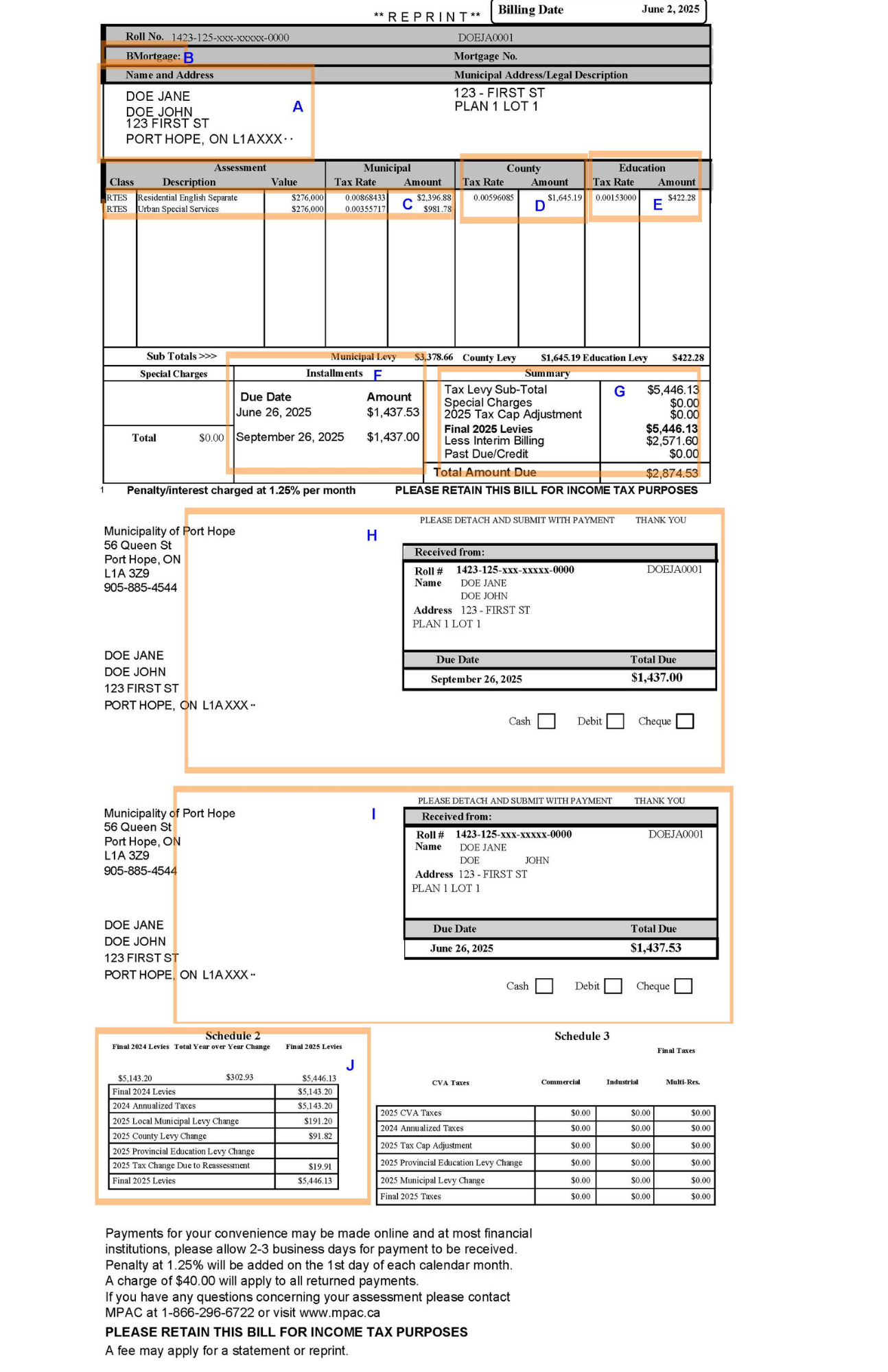
Review the labels and descriptions for each area of your bill:
- Section A - Customer name and mailing address
- Section B - Mortgage company name paying on behalf of owner
- Section C - line one - common Municipal Levy
- Section C - line two - Urban or Rural Special Services Levy
- Section D - County levy
- Section E - Education levy
- Section F - Installment due dates
- Section G - Billing summary of charges since last bill
- Section H - Second Installment remittance stub
- Section I - First Installment remittance stub
- Section J - on back of Final tax bill - Summary of Year over Year changes
An interim levy installment is an early-year payment based on 50% of the previous year's property taxes, issued before the current year's budget and tax rates are finalized. In Port Hope, the Interim property tax is issued in February and split into two installment dates, due at the end of February and the end of April.
A final levy installment bill is issued after the budget is approved and reflects the actual taxes owed for the current year. The interim amount is deducted, and the remaining balance is billed, with two installment dates, due at the end of June and the end of September.
| Question | Answer |
|---|---|
| What are "Common Services"? | Common Services are programs and infrastructure funded by the general municipal levy and provided to all properties--both Urban and Rural--across the Municipality. Everyone contributes because everyone benefits from an available, municipality-wide service level.
|
| What are "Special Services"? | Special Services are programs or service levels that apply to a defined area and are funded only by the properties within that area through an additional "area rate" or "special service" levy. This ensures taxpayers outside the benefiting area do not pay for services they do not receive.
Special Services appear as a separate line item titled 'Urban Special Services' or 'Rural Special Services,' depending on your property's area. |
| How are Special Service areas and rates decided? | Council designates the service and the benefiting area by by-law (under the Municipal Act, 2001). The annual net cost of the service is allocated to properties in that area (commonly by assessment-based rate). The charge appears as a separate line on the tax bill for properties in the area. |
| Will I ever pay both Urban and Rural Special Services? | No. A property is either in the Urban area or the Rural area. You are charged only for the Special Services that apply to your property's designated area. |
| Do these Special Services change my County or Education taxes? | No. County and Education levies are separate lines set by Northumberland County and the Province, respectively. |
| Are water and wastewater included as Common or Special Services? | Neither. Water and wastewater are user-rate utilities billed separately based on consumption or service size; they are not funded through property taxes. |
| How can I confirm whether my property is Urban or Rural for Special Services? | Check the "Property Location/Area" or Special Service lines on your tax bill. If still unsure, contact the Finance office with your roll number; staff can confirm your area designation and applicable services. |
| What if I don't personally use a service (e.g., transit)? | If your property is within the service area, you contribute because the service is available to your area and supports the broader community--similar to other public services. |
| Can these areas or services change? | Yes. Council may update boundaries or service lists through the annual budget/by-law process (with public notice) to reflect service expansions, new subdivisions, or program changes. |
Direction of School Support
Your property taxes support the Municipality's English Public School board by default. The type of school support that you are supporting can be found either on your property assessment notice that you receive from MPAC, or on your property tax bill.
You can change your school support if you meet the criteria. The types of school support include:
- English public
- French public
- English separate (Catholic)
- French separate (Catholic)
- Protestant separate (Penetanguishene only)
If you would like to change the direction of your school support you will need to complete the Change Direction of School Support application on the MPAC website.
We collect school support within your property taxes on behalf of Northumberland County and the School Boards.